
If you’ve been exploring modern WordPress design, you’ve probably come across the term block theme. But what exactly is a WordPress block theme, and how does it differ from traditional themes?
In this guide, we’ll break down what WordPress block themes are, how they work, and why they are quickly becoming the future of website design.
What Is a WordPress Block Theme?
A WordPress block theme is a theme that fully supports Full Site Editing (FSE), a feature introduced in WordPress 5.9 in January 2022. Unlike traditional themes, block themes allow you to design and customise every part of your website using blocks.
With a block theme, you can edit your:
- Header
- Footer
- Page templates
- Blog layouts
- Navigation menus
— all within the Site Editor, using the same block-based interface you use for posts and pages.
This means you no longer need to rely on code or third-party page builders to make structural changes to your site.
How Do WordPress Block Themes Work?
Block themes use the WordPress Block Editor (Gutenberg) as their core design system. Instead of PHP template files controlling your layout, block themes use HTML-based templates combined with blocks.
Here’s how it works:
1. Block-Based Templates
Every part of your website is made up of blocks. These blocks are arranged into templates, such as:
- Single post template
- Page template
- Archive template
You can edit these templates visually without touching code.
2. Template Parts
Reusable sections like headers and footers are created as template parts. You can update them once and apply changes across your entire site.
3. Global Styles
Block themes include a Global Styles feature, allowing you to control:
- Colours
- Typography
- Spacing
- Layout settings
— all from one central place.
4. Site Editor
The Site Editor is where everything comes together. It gives you a visual, drag-and-drop interface to design your entire website.
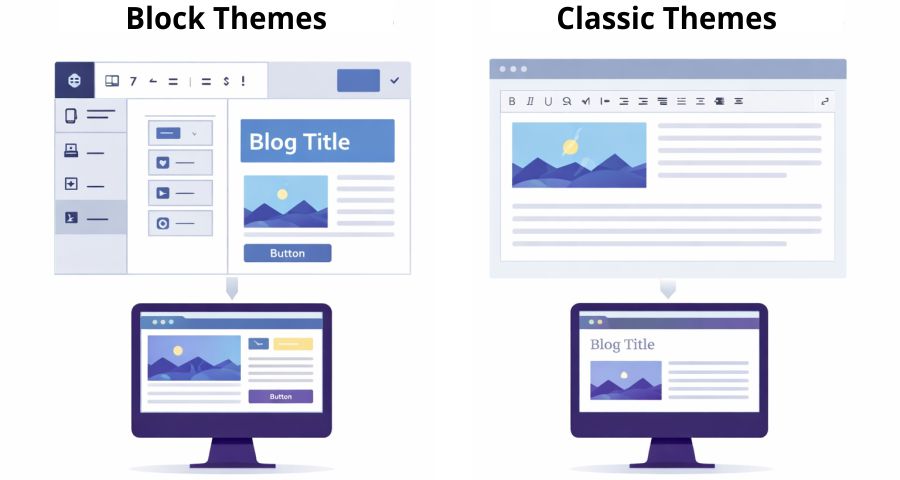
Block Themes vs Classic Themes
Understanding the difference between block themes and classic themes is key to choosing the right approach for your website.
Classic WordPress Themes
Traditional WordPress themes (often called classic themes) are built using PHP templates. While they are powerful, they have some limitations:
- Customisation is done through the Customizer
- Layout changes often require coding knowledge
- Advanced design typically needs page builder plugins
- Less visual control over the full site
Block Themes
Block themes, on the other hand, offer a modern and flexible approach:
- Full visual editing with blocks
- No coding required for layout changes
- Built-in design system
- Greater consistency across the site
In short, block themes bring design and content creation into one unified experience.
Key Advantages of WordPress Block Themes
1. Full Site Editing (FSE)
The biggest advantage is Full Site Editing. You can customise every part of your website visually, without switching between different tools.
This simplifies the workflow and makes WordPress more beginner-friendly.
2. No Need for Page Builders
With block themes, you don’t need plugins like Elementor or WPBakery to design your site. Everything is built directly into WordPress.
This can:
- Improve site performance
- Reduce plugin conflicts
- Simplify maintenance
3. Consistent Design System
Global Styles ensure that your design stays consistent across your entire website.
For example, changing your primary colour or font will automatically update everywhere it’s used.
4. Better Performance
Because block themes rely less on external plugins and heavy scripts, they often load faster than traditional setups that use page builders.
Faster websites mean:
- Better user experience
- Improved SEO rankings
5. Future-Proof Technology
WordPress is actively investing in block-based development. This means block themes are not just a trend—they are the future of the platform.
Adopting block themes now ensures your site stays up to date with WordPress advancements.
Are There Any Downsides?
While block themes offer many benefits, they’re not perfect for every situation.
Learning Curve
If you’re used to classic themes, the Site Editor may feel unfamiliar at first. However, once you understand how blocks work, it becomes intuitive.
Compatibility Issues
Some older plugins and tools may not fully support block themes yet. Always check compatibility before switching.
Limited Legacy Support
If your website relies heavily on custom PHP templates, transitioning to a block theme may require adjustments.
Who Should Use a WordPress Block Theme?
Block themes are ideal for:
- Beginners who want full control without coding
- Designers who prefer visual editing
- Businesses looking for a streamlined website setup
- Bloggers who want flexibility in layout and design
However, developers working on highly custom projects may still prefer classic themes in certain cases.
How to Get Started with a Block Theme
If you’re ready to try a block theme, here are the basic steps:
- Install a block theme from the WordPress theme directory
- Activate the theme
- Go to the Site Editor
- Start customising templates and styles
- Experiment with blocks to build your layout
Popular block themes include options like Twenty Twenty-Four and other modern, FSE-ready designs.
Final Thoughts
WordPress block themes represent a major shift in how websites are built. By combining content creation and design into a single visual interface, they make website building more accessible, flexible, and efficient.
Whether you’re a beginner or an experienced user, block themes offer a powerful way to create modern websites without relying on complex tools or coding.
As WordPress continues to evolve, embracing block themes is one of the best ways to stay ahead.

Cimeron Collins
Cimeron is an artist and designer based in Edenvale, South Africa, with over 30 years of experience in the printing and publishing industries.
He’s also an avid WordPress enthusiast who strives to stay up to date with the latest trends in web design and development, constantly exploring new technologies and refining his skills.

Leave a Reply