
Image alt text, also known as alternative text or alt attributes, helps describe the appearance and purpose of an image on a web page. Adding alt text improves website accessibility, helps search engines understand your images, and can strengthen your SEO performance.
In this article, you’ll learn what image alt text is, why it matters, and how to write effective alt text for your website images.
What Is Image Alt Text?
Image alt text is an HTML attribute added to an image tag to describe the image content.
Here is an example of image alt text:
<img src="labrador-drawing.jpg" alt="Pencil drawing of two Labrador dogs">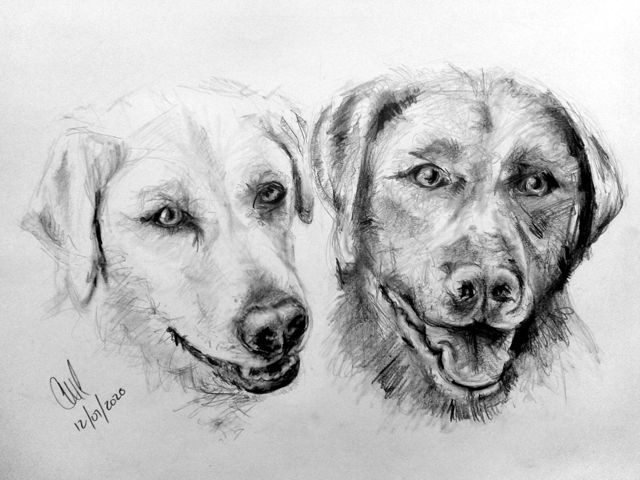
If an image fails to load, browsers display the alt text instead of the image. Screen readers also use alt text to describe images to visually impaired users. You will see something like this in your browser if the image above can’t be loaded:

Alt text gives search engines valuable context about an image and the content of the page.
Why Image Alt Text Matters for SEO
Search engines cannot “see” images the same way humans do. They rely on alternative text and surrounding content to understand what an image represents.
Adding descriptive alt text helps search engines:
- Understand image content
- Improve image indexing
- Match images to relevant search queries
- Strengthen page relevance for target keywords
Images without alt text create missed SEO opportunities. Well-written alt text can improve both your website rankings and image search visibility.
Read more about SEO Basics you can implement yourself to help improve your website’s ranking.
Why Alt Text Improves Accessibility
Alt text plays an important role in web accessibility. Screen readers read the alternative text aloud so visually impaired users can understand the purpose and context of an image.
Clear and descriptive alt text creates a better browsing experience and helps make your website accessible to a wider audience.
Best Practices for Writing Image Alt Text
Follow these guidelines when writing alt text for SEO and accessibility:
Describe the Image Clearly
Write a short, accurate description of the image and its purpose on the page.
Good example:
“Golden retriever puppy playing in the grass”
Avoid vague descriptions like:
“Dog image”
Keep Alt Text Concise
Aim for fewer than 125 characters where possible. Many screen readers shorten longer descriptions.
Avoid “Image of” or “Picture of”
Screen readers already identify images automatically, so phrases like “image of” add unnecessary repetition.
Instead of:
“Picture of a sunset over Cape Town”
Use:
“Sunset over Cape Town coastline”
Use Keywords Naturally
Include keywords only when relevant to the image and page content. Avoid keyword stuffing or unnatural phrasing.
Match the Page Context
Your alt text should support the topic of the page. Relevant descriptions improve both user experience and SEO relevance.
How to Add Alt Text in WordPress
Most modern CMS platforms and website builders make it easy to add image alt text without editing HTML.
In WordPress, you can add or edit alt text from the Media Library attachment details panel when uploading or selecting an image.
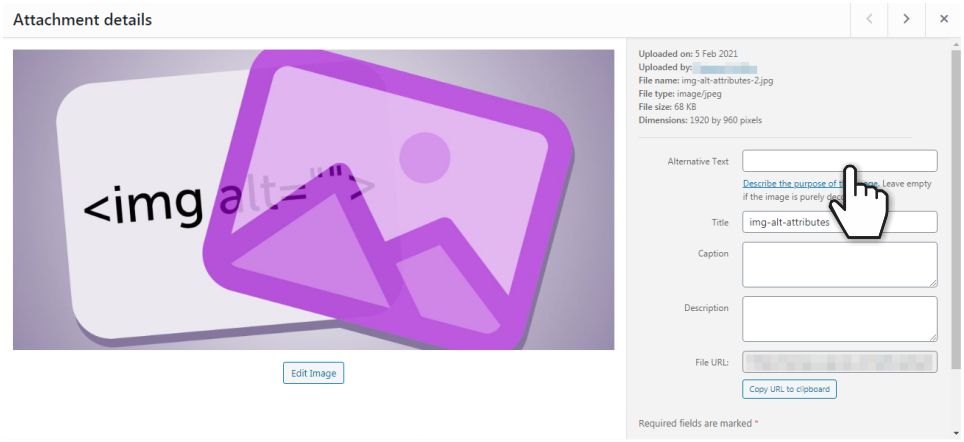
Other CMS platforms and page builders offer similar options within their image settings.
Adding Alternative Text to Social Media Images
Social media platforms also allow custom alt text for uploaded images.
In Facebook, you can add alternative text by editing the image after uploading it to a post. The platform provides a field where you can enter a custom image description.

Adding alt text to social media images improves accessibility and can provide additional context for your content.
Common Alt Text Mistakes to Avoid
Avoid these common mistakes when writing image alt text:
- Repeating the same alt text across multiple images
- Using generic descriptions
- Stuffing keywords into every image
- Writing overly long descriptions
- Leaving important images without alt text
Final Thoughts on Image Alt Text
Image alt text improves both accessibility and SEO. It helps visually impaired users understand your content while giving search engines valuable information about your images.
Spending a few extra minutes writing descriptive alt text can improve your website’s usability, search visibility, and overall user experience.
Need Help Optimising Your Website Images and Alt Text?
If you need help improving your website’s accessibility, SEO, or image alt text, feel free to contact me. Visit my home and services pages to learn more about who I am and how I can help improve your website.

Cimeron Collins
Cimeron is an artist and designer based in Edenvale, South Africa, with over 30 years of experience in the printing and publishing industries.
He’s also an avid WordPress enthusiast who strives to stay up to date with the latest trends in web design and development, constantly exploring new technologies and refining his skills.

Leave a Reply