

Keeping your WordPress website organised is important for both visitors and search engines. One of the easiest ways to structure your content is by using WordPress categories and tags correctly. However, many website owners either misuse them or avoid using them altogether because they are unsure of the difference.
In this guide, we explain what WordPress categories and tags are, how they work, common mistakes to avoid, and how they can help improve your website structure and SEO.
What Are WordPress Categories and Tags?
Categories and tags are WordPress taxonomies used to organise content on your website. While they may seem similar, they serve different purposes.
What Are WordPress Categories?
WordPress categories are used to group your blog posts into broad topics. Think of categories as the main sections of your website, similar to a table of contents in a book.
Categories help visitors quickly find related content and make it easier for search engines to understand your website structure.
Here are some important things to know about WordPress categories:
- Categories organise posts into broad topics.
- Categories are hierarchical, meaning you can create parent categories and subcategories.
- Every WordPress post must have at least one category.
- If you do not assign a category, WordPress automatically places the post in the default “Uncategorised” category.
For example, a web design website may use categories such as:
- Web Design
- WordPress
- SEO
- Digital Marketing
What Are WordPress Tags?
WordPress tags are used to describe specific details within a post. They work like keywords or index terms that help users discover related content.
Unlike categories, tags are optional and are not hierarchical.
Important points about WordPress tags include:
- Tags provide more detailed organisation.
- Tags help connect related posts across categories.
- Posts do not require tags.
- Tags should describe specific topics discussed in a post.
For example, a WordPress tutorial post could include tags such as:
- plugins
- website speed
- SEO tips
- WordPress editor
Common WordPress Categories and Tags Mistakes
Many website owners make mistakes when organising their content. Here are some of the most common issues to avoid.
1. Creating Too Many Categories
One of the biggest mistakes is creating too many categories in an attempt to rank for more keywords.
Categories should remain broad and easy to manage. Instead of creating dozens of categories, use subcategories and tags to organise more specific topics.
2. Not Using Categories and Tags at All
Some users avoid categories and tags because they worry about SEO penalties. In reality, using them correctly improves website organisation and user experience.
The key is moderation and relevance.
3. Using Duplicate Categories and Tags
You should avoid creating a category and a tag with the same name.
For example, if you already have a category called “Graphic Design”, you should not also create a tag called “Graphic Design”. Duplicate taxonomies can confuse search engines and create unnecessary archive pages.
4. Using Singular and Plural Versions
Another common issue is creating multiple versions of the same tag or category, such as:
- website
- websites
Choose one version and use it consistently across your website.
5. Creating Categories for Authors
Some multi-author blogs create categories for each author. This is unnecessary because WordPress already includes author archive pages automatically.
6. Using Too Many Tags
Adding excessive tags to a post does not improve SEO. WordPress tags are not the same as social media hashtags.
Instead of adding dozens of tags, focus on a small number of relevant terms that genuinely describe the content.
How to Add Categories and Tags in WordPress
Adding categories and tags in WordPress is simple and can be done directly from the post editor.

How to Add a New Category
To create a new category in WordPress:
- Open the post editor.
- Click the Settings icon in the top-right corner.
- Select the Post tab.
- Scroll down to the Categories section.
- Click Add New Category.
- Enter your category name.
- Click Add New Category to save it.
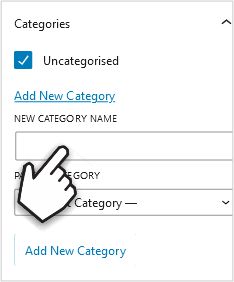
Remember to remove the “Uncategorised” option when assigning a proper category to your post.
How to Create Subcategories
Subcategories help organise content under broader parent categories.
For example:
- WordPress
- Plugins
- Themes
- Security
To create a subcategory:
- Save the category.
- Create or select a parent category.
- Enter the new category name.
- Choose the parent category from the dropdown menu.

How to Add Tags in WordPress
To add tags:
- Open the post editor.
- Scroll to the Tags section.
- Type your tag names into the field.
- Press Enter after each tag.
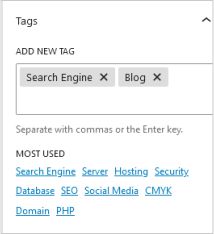
You can also select from existing tags already used on your website.
How to Edit Categories and Tags in WordPress
You can edit categories and tags from the WordPress dashboard.
To manage them:
- Go to Posts > Categories
- Or go to Posts > Tags
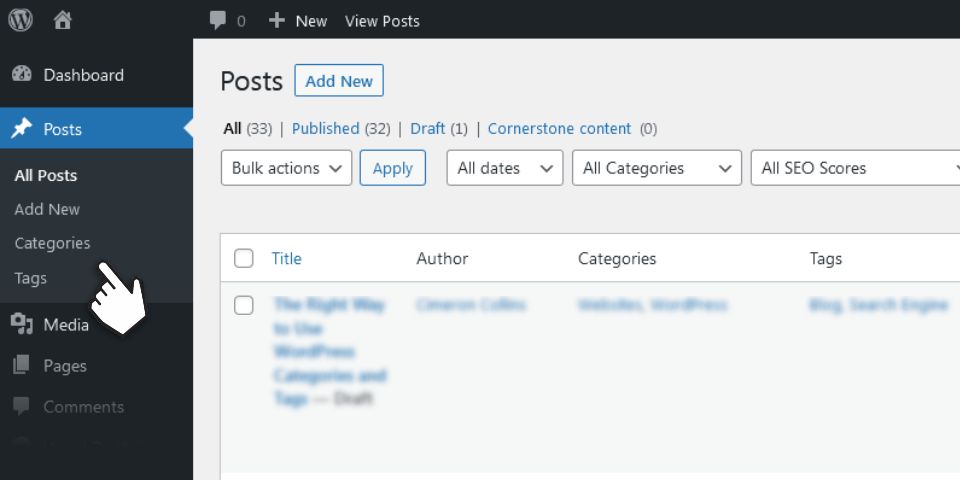
From these pages, you can:
- edit names
- change slugs
- add descriptions
- delete unused taxonomies
- create new categories or tags
Keeping your categories and tags organised makes your website easier to navigate and maintain.

Do Categories and Tags Help SEO?
WordPress categories and tags do not directly improve rankings on their own. However, they play an important role in website structure and user experience, which can positively affect SEO.
When used correctly, categories and tags help:
- improve website navigation
- organise content clearly
- reduce duplicate content issues
- help search engines understand your site structure
- increase internal linking opportunities
Poorly organised taxonomies, on the other hand, can create duplicate pages and keyword cannibalisation issues.
Best Practices for WordPress Categories and Tags
To use WordPress categories and tags effectively, follow these best practices:
- Keep categories broad and limited in number.
- Use tags sparingly and only when relevant.
- Avoid duplicate category and tag names.
- Use consistent naming conventions.
- Create subcategories when needed.
- Regularly review and clean up unused tags.
Final Thoughts
Understanding the difference between WordPress categories and tags is essential for organising your website properly. Categories should group broad topics, while tags should describe specific details within your posts.
Using categories and tags correctly improves user experience, keeps your content organised, and helps search engines better understand your website structure.
Need Help With WordPress?
If you need help managing your WordPress website or improving your SEO, feel free to get in touch with us. Visit our home and services page for more about us and what we do.

Cimeron Collins
Cimeron is an artist and designer based in Edenvale, South Africa, with over 30 years of experience in the printing and publishing industries.
He’s also an avid WordPress enthusiast who strives to stay up to date with the latest trends in web design and development, constantly exploring new technologies and refining his skills.
Please share this article if you found it useful

Leave a Reply